replicateEverything is a prototype system to:
- structure replication code as a connected pipeline
- fetch and run that code from a DOI (or registry handle)
- check that it still works — one study, or a whole journal at once
- link base replications to downstream re-analyses without copying files
You can use it from R or your browser.
TL;DR — just do this
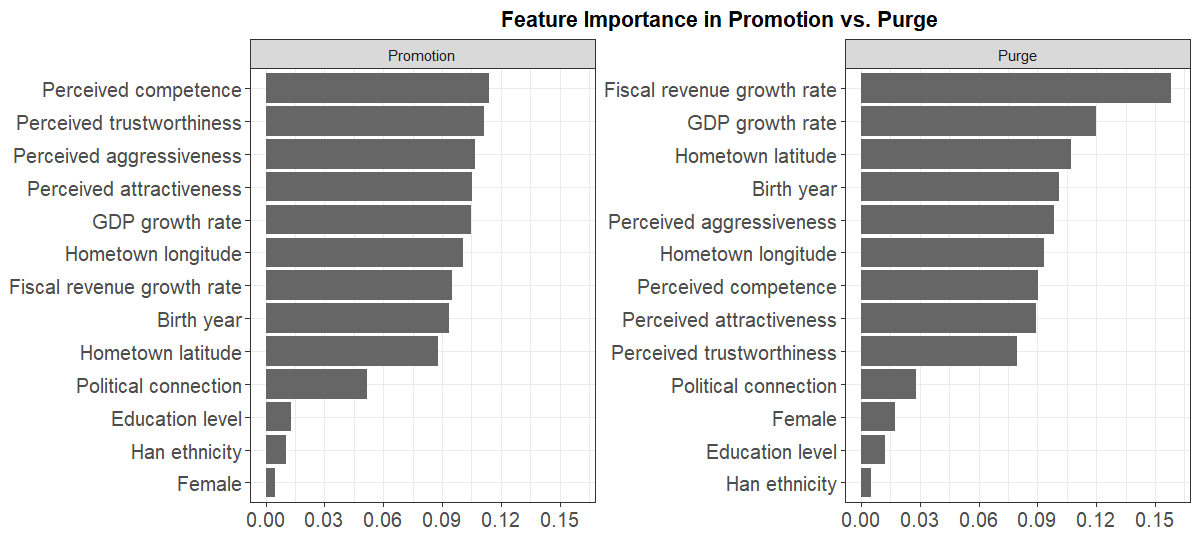
# Figure 4 from Jiang and Yang (2026)
replicateEverything::run_replication(
  doi = "10.1017/s0003055426101749",
  what = "fig_4"
)
Why bother?
Computational replication has never been easier. But it is still a bit of a jungle. Archives are too often ad hoc in structure, paths shift, dependencies drift, and every new reader has to re-wrangle the collection of files they download from dataverse or osf. Plus there are no guarantees: Nobody runs a standing check that the archive still runs today.
replicateEverything contributes by proposing a format
that makes code quickly accessible and runnable.
Are we fighting the last battle? You might wonder (we certainly wonder): if an AI can rewrite the analysis from a paper on the fly, why keep an authoritative codebase? Our answer: Because the code is a record of analytic choices. When results disagree, you need a shared object to inspect, not a fresh vibe-coded reimplementation. That case gets stronger, we think, as models get better at improvising.
So this is an attempt to keep humans in the loop.
Relation with existing repositories
replicateEverything does not replace long-term
structured repositories such as ICPSR, OSI, and Dataverse. You can think
of it as an portal. Though we are not there yet, we
would love to get to the point where replicateEverything
simply reads from existing repositories directly.
For preparing a deposit, the guidance in AEA
Data Editor guidance and the Data and Code Availability
Standard (data–code separation and related rules) is excellent.
However, in addition we want to be sure we have want a common,
machine-readable layout that is legible to humans. For this, we ask for
two things: data/analysis packaged into human consumable steps and a
replication.yml that provides a machine readable
roadmap.
Here’s a walk through of the main elements plus the bells and whistles.
The registry (what is in there so far)
The registry indexes studies with lightweight stubs; code and data live in linked study repos. The index is still small — but you can browse what is there:
library(replicateEverything)
head(load_index()[, c("doi", "title", "year")])
Example output:
#>  doi                         title                                   year
#>  10.1177/00491241211036161   Bounding Causes of Effects ...          2022
#>  10.1017/S0003055403000534   Ethnicity, Insurgency, and Civil War    2003
#>  10.1017/s0003055426101749   ...                                     2026
Each study in the registry has a designated maintainer; right now that is us, but we hope that others will start adding and commit to maintaining.
Run one result, from the top or from the middle
Pass a DOI and a step id (fig_1, tab_1,
…):
library(replicateEverything)

# Replicate table 1 assuming any parent steps have already been run
run_replication(
  doi = "10.1017/S0003055403000534",
  what = "tab_1"
)

# Replicate table 1 assuming no parent steps have been run
run_replication(
  doi = "10.1017/S0003055403000534",
  what = "tab_1",
  given = "nothing"
 )

# Running step: analysis_data
# Running step: tab_1
list_replications() shows what you can run from a given
study:
list_replications("10.1017/S0003055403000534")
# Replications: Ethnicity, Insurgency, and Civil War [10.1017/s0003055403000534]
# id          type   engine  label
# tab_1       table  r       Table 1
# tab_1_stata table  stata   Table 1
Run from top to bottom to get a list of all objects created including all intermediate datasets.
run_replication("10.1017/S0003055403000534", what = "everything")For what = "everything", upstream prep runs
automatically (given defaults to "nothing").
For a single table or figure, the default is "parents" —
use existing intermediate outputs when they are already on disk.
Pass format = TRUE for display-ready HTML or formatted
plots; the default returns raw analysis objects (models,
ggplots, and so on).
Repo structures
The yaml is our big ask
The main ask of repo contributors is that you provide a
yaml file to accompany your repo.
The yaml file is a simple text file that provides a map
to making sense of your archive. Once replicateEverything
has access to this file it knows what objects are produced, where the
code is that makes them, where they fit in relation to each other, what
their dependencies are, what languages they use, where their outputs get
saved. From there it can put everything together, produce lovely output
and expose code on demand. A basic yaml is easy to write
and in the template rep we give a simple example in our template.
Replication archives are DAGs
A minimally complex replication archive specifes a set of steps to
get from raw data to publication ready outputs. It has an implied
directed acyclical graphical (DAG) structure.
replicateEverything reads that graph from
replication.yml so you can start from prepared data or from
scratch.
describe_study_dag("10.1017/S0003055403000534")See Reanalysis and extension studies for downstream repos that inherit upstream steps without duplicating code.
Wrinkles and features
Reanalysis without redundancy
You want to re-analyze a study with minimal alterations? Extension
studies set paper.extends and inherit: steps.
Inherited prep runs in the base repo; new analysis reads base
outputs/. Details:
vignette("reanalysis-studies").
Many languages, one entry point
Folder-backed studies may mix R, Stata, and Python. Pick the engine
with language = when both exist. See
vignette("stata-replications").
# Stata when both engines exist:
run_replication(
  doi = "10.1257/aer.91.5.1369",
  what = "tab_2",
  language = "stata"
)
Code exposure
When you prepare a replication repository you have some discretion in
how much code you expose and how much you tuck away out of view. Tucking
things away can make code easier to read but also risks reducing
transparency. replicateEverything uses two approaches to
manage the trade off. First you can use the DAG structure to package
separately discrete steps (like data preparation) that do not need to be
rerun often but that users nevertheless might want to inspect and other
steps where the most important action happens (analysis steps, perhaps).
Second, when the replicateEverything shiny displays code
that itself sources from other code files (source(...)) you
can click on these sourcing lines to take you to nested code files.
Collections
The registry rows carry collections tags
(APSR, PED, IPI,
World Bank, …) for filtering in the Shiny bibliography. To
audit every study in a collection:
audit_everything(patience = 20, collections = "APSR")As a researcher you could have a collection of all your own studies. As a journal you could have a collection of yours only. You can run an instance of the shiny app restricted to studies in your collection only.
Using AI to prep your archive
The fastest path from a messy delivery to a registry-ready study is
often an agent with the package skills — markdown
playbooks shipped in inst/ai/skills/:
ai_skills()
# folder-replication       — generic folder-backed study repo
# dataverse-to-replicate-everything — Harvard Dataverse replication deposits
Point Cursor (or another agent) at the skill, give it your
replication folder, and ask it to produce replication.yml
with a steps: DAG, outputs/ paths, tests, and
a registry stub. The skills spell out layout, dependency probing,
substantive tests, and check_replication().
Practical tips without an agent:
- Start from the published code, not a rewrite — discover the true pipeline (what reads what) before you yaml it.
-
One script per step; declare inputs, outputs, and
parents in
steps:. -
Run
check_and_bake_study()(which callscheck_replication()) before opening a registry PR. -
Add substantive tests under
tests/substantive/when you have published benchmarks (see Fearon & Laitintab_1).
Skill files live at
system.file("ai/skills", package = "replicateEverything")
after install.
Where to go next
| If you want to… | Read |
|---|---|
| Tour every main function | vignette("meet-the-functions") |
| Run examples from code | vignette("replication-example") |
| Build or migrate a folder-backed study | vignette("folder-replication-checklist") |
| Onboard a Harvard Dataverse deposit | skill dataverse-to-replicate-everything
|
| Add a reanalysis repo | vignette("reanalysis-studies") |
| Use Stata (or bilingual R/Stata) | vignette("stata-replications") |
| Browse and run in the browser | vignette("shiny-app") |
| Audit the whole registry | vignette("audit") |
| Install dependencies on a server | vignette("maintainer-setup") |
| Package-backed studies | vignette("package-replication-checklist") |
Live app: shiny2.wzb.eu/ipi/replicate/. Registry: github.com/replicate-anything/registry.